Turn a GitHub repository into an East Agile Tracker board: import issues as stories with an agent key, dry-run first, then let the agent work a story.
Point an agent at a GitHub repository and you get back a working board: every issue as a story, in the state its history says it should be in, with checklists, labels, and milestones carried across. Then the same agent picks a story up, claims it, moves it through the state machine, and links the pull request it opened.
This page is that loop end to end. The population step has two routes: GitHub-to-EAT, East Agile’s open-source importer, does it in one command (step 3); the import API does the same work call by call (steps 4 and 5), which is what an agent drives when it wants the job handle. Everything after that runs on the API, because the point is that an agent can do the rest unattended.
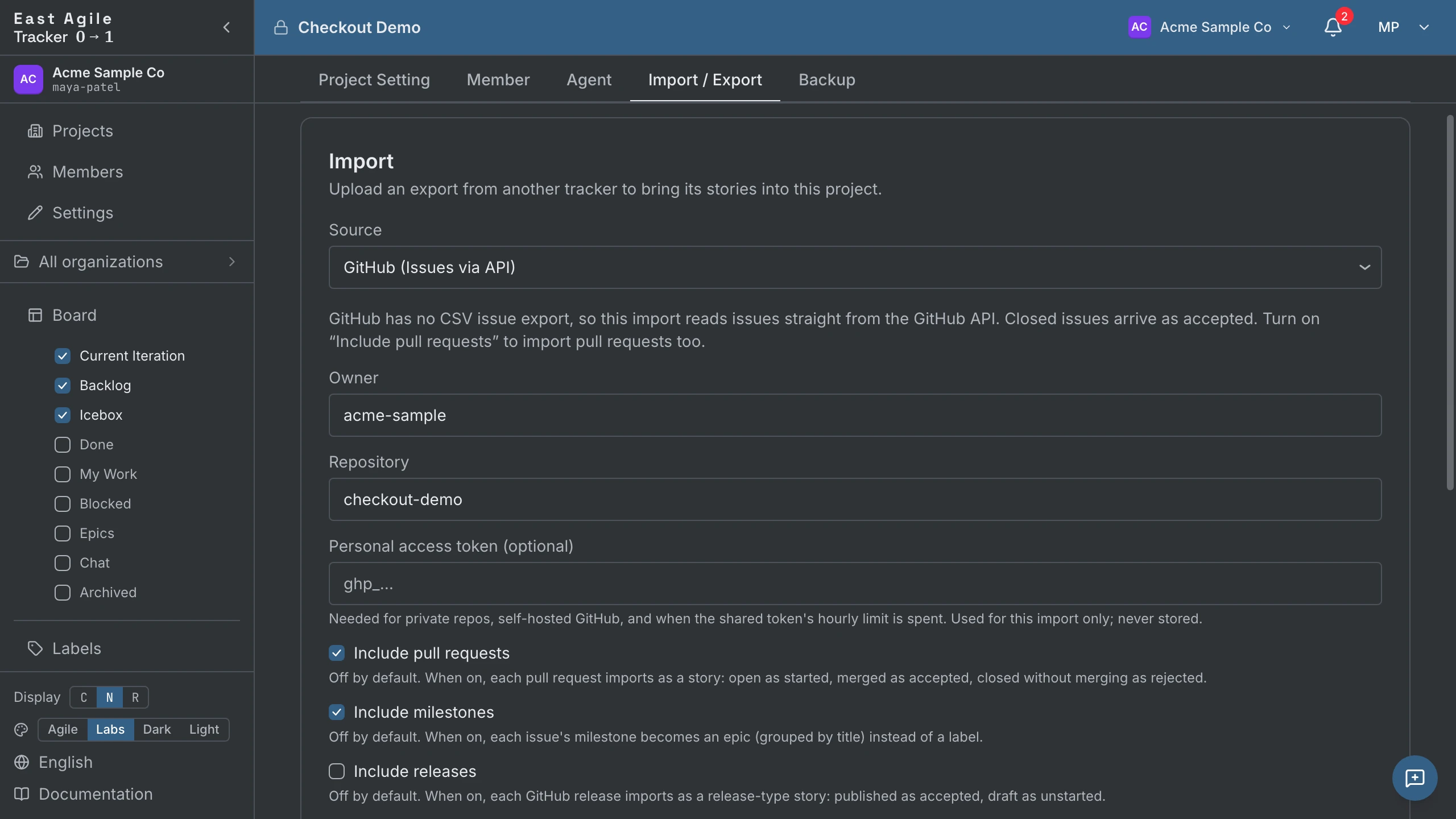
This is not a separate “AI import”. The population step is the same GitHub importer you can run by hand from Project Settings → Import / Export, described in Operating Instructions → Importing from other trackers. The agent calls the same endpoint you would. What this page adds is everything around it: who holds the key, how to check the import before it writes, and what the agent does with the board once it exists.
What you need
Section titled “What you need”- A project — and a session or
ea_user_…key to create it with. - An agent key — an
ea_agent_…key scoped to that project. Which role it needs depends on how much of the loop you want the agent to run; see step 2. See also API Guide → Two kinds of keys. - A GitHub personal access token — with read access to the repository’s issues. Every import authenticates, because the fetch runs on GitHub’s GraphQL API and GraphQL refuses a request that carries no token. You can omit it only when the Tracker fetches on your behalf: a public repository, on a deployment that has a shared fallback token (the hosted eastagiletracker.com has one; a self-hosted install has none until its operator sets
GITHUB_IMPORT_PAT), and not with GitHub-to-EAT’s--engine direct. See Tokens and rate limits. - Node.js 22+ — only for the GitHub-to-EAT route in step 3. The API route needs nothing but
curl.
1. Create the project
Section titled “1. Create the project”The project has to exist before the agent key does, and it has to be created by a person: agent keys are bound to one project at mint time and cannot bootstrap projects. Make it in the UI, or with your own ea_user_… key:
curl -X POST https://api.eastagiletracker.com/api/v1/projects \ -H "X-TrackerToken: $TRACKER_USER_TOKEN" \ -H "Content-Type: application/json" \ -d '{"name": "hello-world", "iteration_length_weeks": 1}'The response carries the project_id every call below needs.
2. Mint an agent key
Section titled “2. Mint an agent key”Agent keys are created in Project Settings → Agent, by the project roles its agent-key policy allows (managers and members by default). The role you pick decides how much of this page the agent can do on its own, and there are two sensible answers:
manager— one key runs the whole loop, import included. Importing is manager-only, because an import rewrites the shape of a project wholesale. Minting a manager-role agent requires you to be a project manager yourself: an agent’s role can never exceed its creator’s.member— least privilege. The agent claims stories, moves them, comments, and links pull requests, but cannot import. You run the import yourself (step 5) with your own key, then hand the board to the agent.
Either way, do not leave it at the default. A new agent key is viewer unless you say otherwise, and a viewer can read the board but cannot claim or move a story — which is most of this loop.
Agent keys matter here for a reason beyond access. An agent key acts as a named participant in one project, so every story it creates, every state change it makes, and every comment it writes is attributed to that agent in the history — distinguishable from your own work rather than blurred into it.
export TRACKER_TOKEN="ea_agent_xxxxx"Have the agent read /meta before anything else:
curl https://api.eastagiletracker.com/api/v1/meta \ -H "X-TrackerToken: $TRACKER_TOKEN"That answers the two questions an agent would otherwise guess at: which project the key is bound to (auth.project_id), and which state moves are legal for each story type (transitions). A feature runs unstarted → started → finished → delivered → accepted; a chore is just unstarted → started → accepted. Reading the map beats hard-coding it.
3. Import with GitHub-to-EAT
Section titled “3. Import with GitHub-to-EAT”GitHub-to-EAT is East Agile’s own open-source importer: an MIT-licensed command-line tool that does the whole population step — steps 4 and 5 below — in one command. Reach for it when a person is at a terminal. Reach for the API underneath it when an agent is driving unattended and wants the job handle to poll.
It needs Node.js 22+ and has no runtime dependencies of its own. It is not published to npm yet, so install it from the repository:
git clone git@github.com:EastAgile/GitHub-to-EAT.gitcd GitHub-to-EATnpm install --global .Then point it at the key you minted in step 2 and the project you made in step 1:
export EAT_AGENT_KEY="ea_agent_xxxxx"github-to-eat --project $PROJECT_ID --repo octocat/hello-worldIt prints a mapping legend first — exactly how each selected type will land — and asks you to confirm before it writes anything. Off a terminal, in a pipe or CI or an agent, there is nowhere to show that prompt, so a run that would write has to pass --yes; without it the tool exits 2 and writes nothing rather than guessing your answer. Re-running is safe: anything already imported is skipped, never duplicated.
| Flag | What it does |
|---|---|
--dry-run | Preflight, then print the plan it would carry out — how many stories it would import, how many it would skip as already there — and write nothing. Needs no --yes. |
--include | Which types to import, comma-separated: issues,prs,milestones,releases,deps. Defaults to issues, and every selection has to contain it. These are the same opt-ins as the table in step 6. |
--token | Your GitHub personal access token (GITHUB_TOKEN in the environment or a .env counts too). It needs repo, or fine-grained Issues: Read, on that repository. Required for a private repository, for a server with no shared fallback token, and always for --engine direct. Omit it on the hosted service’s default engine and the Tracker spends its own shared budget — see Tokens and rate limits. |
--engine | server, the default, sends one /import/json call and lets the Tracker fetch, map and write. direct runs that same pipeline on your machine and writes through the public API instead — so it reads GitHub itself and always needs a token, exiting 2 without one. |
--states, --milestones, --story-type, --no-comments, --no-tasks | Narrow or override the mapping for one run; nothing is persisted. Each one implies --engine direct. --customize asks the same questions interactively instead — it needs a terminal and can’t be combined with these flags. |
Set EAT_API_BASE and EAT_APP_BASE to point it at a self-hosted or local Tracker; both default to the hosted service. The README carries the full flag reference, the exit codes, and troubleshooting.
Everything below is that same import driven call by call, which is what you want when an agent runs it.
4. Dry-run first
Section titled “4. Dry-run first”Importing is manager-only — use a manager-role agent key, or your own key if you kept the agent at member. Run it with dry_run first, before you let it write anything:
curl -X POST https://api.eastagiletracker.com/api/v1/projects/$PROJECT_ID/import/json \ -H "X-TrackerToken: $TRACKER_TOKEN" \ -H "Content-Type: application/json" \ -d '{ "source": "github", "owner": "octocat", "repo": "hello-world", "include_pull_requests": true, "include_milestones": true, "dry_run": true }'A dry run fetches from GitHub, resolves, and de-duplicates exactly as the real thing, reports the same counts — imported, skipped, errors, unmatched — and then rolls the whole transaction back. Nothing persists and no completed-import event reaches your audit log. It is the cheapest way to find out that you meant to opt milestones in, or that a repo is larger than you thought, while it still costs you nothing.
Every call to /import/json is asynchronous, the dry run included: the endpoint returns 202 with a job handle, not a result, and the counts arrive on the job when you poll it (step 5). A dry run’s job reaches done like a real one; the difference is that nothing was written.
5. Run the import
Section titled “5. Run the import”Drop dry_run and send it again. As before, the endpoint returns 202 with a job handle:
{ "import_id": "…", "status": "pending" }Poll the job until it reaches a terminal state:
curl https://api.eastagiletracker.com/api/v1/projects/$PROJECT_ID/imports/$IMPORT_ID \ -H "X-TrackerToken: $TRACKER_TOKEN"Status runs pending → fetching → writing → done | failed. Only the last two are terminal: done carries the result counts, failed carries an error message and a stable machine code you can branch on. While the fetch is paginating, progress_current and progress_total tell you which page it is on — worth surfacing if a human is watching.
Tokens. Pass "token": "github_pat_…". Leave it out and the server substitutes the shared platform token, which is public-repos-only and metered across every caller on the deployment — Tokens and rate limits covers what that costs you. Whichever token is used, it drives the upstream GitHub calls and nothing else: it is never logged, never audit-logged, never stored, and never echoed back in a response or an error.
Re-running is safe. A row that was already imported is matched by its source id and skipped, not duplicated. A second import tops the board up with what appeared since the first.
6. What lands on the board
Section titled “6. What lands on the board”Rows marked default import with no flag; comments import unless you send include_comments: false. Everything else is opt-in, one flag each:
| From GitHub | Becomes | Flag |
|---|---|---|
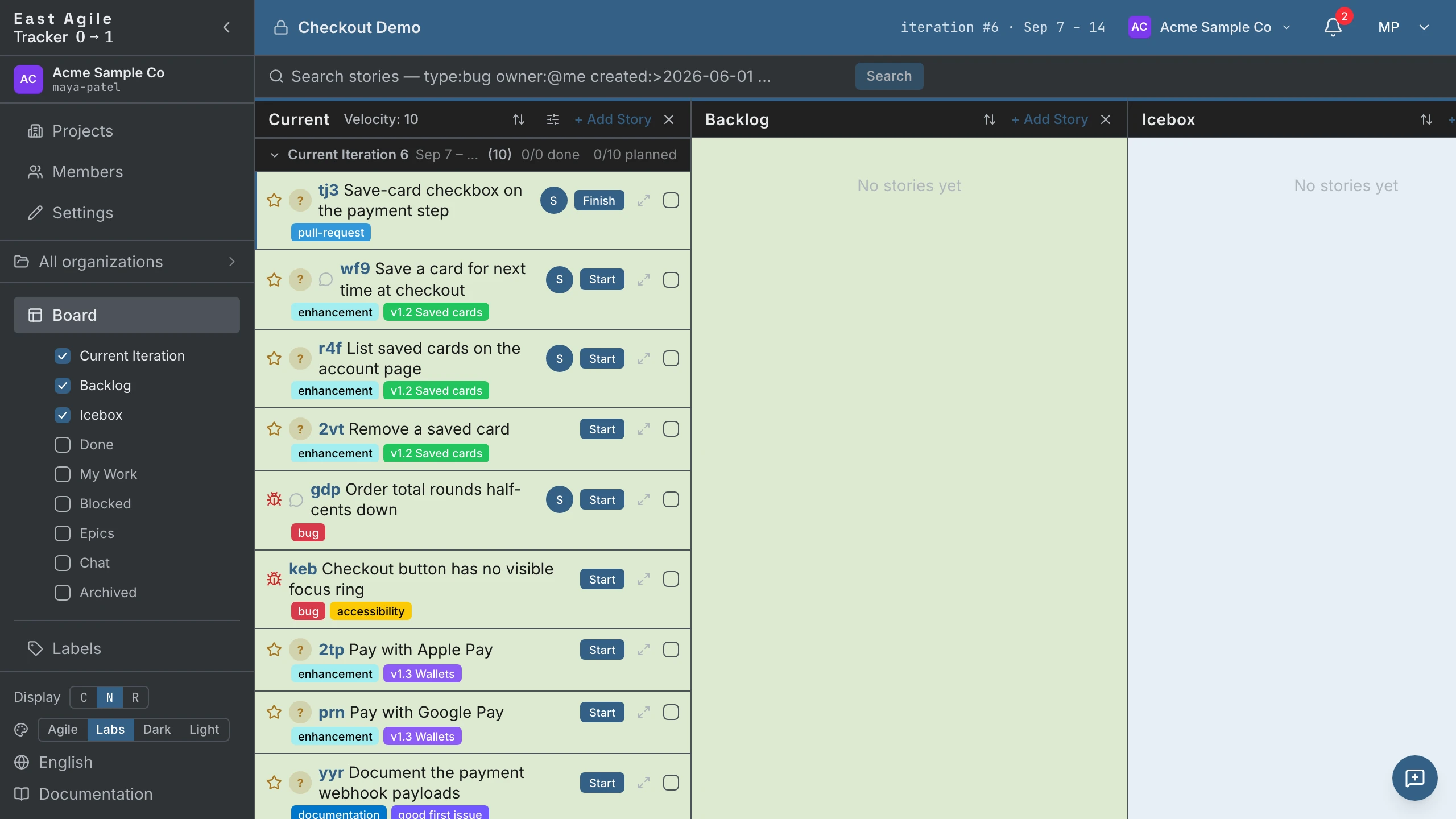
| Issue | A story. Open → unstarted in the Backlog. Closed → accepted, or rejected when GitHub says the issue was closed as not_planned or duplicate (the story then carries a not-planned or duplicate label). Only features and bugs can be rejected; a chore closed that way stays accepted. | default |
| Issue body checklist | Tasks — each - [ ] / - [x] line becomes one task in body order, [x] arriving complete. The checklist also stays in the description. | default |
| Labels | Labels, carried across as-is. | default |
| Comments | A comment on the story, with its GitHub author and original date. Turn it off to spend fewer rate-limit points. | default — send include_comments: false to skip |
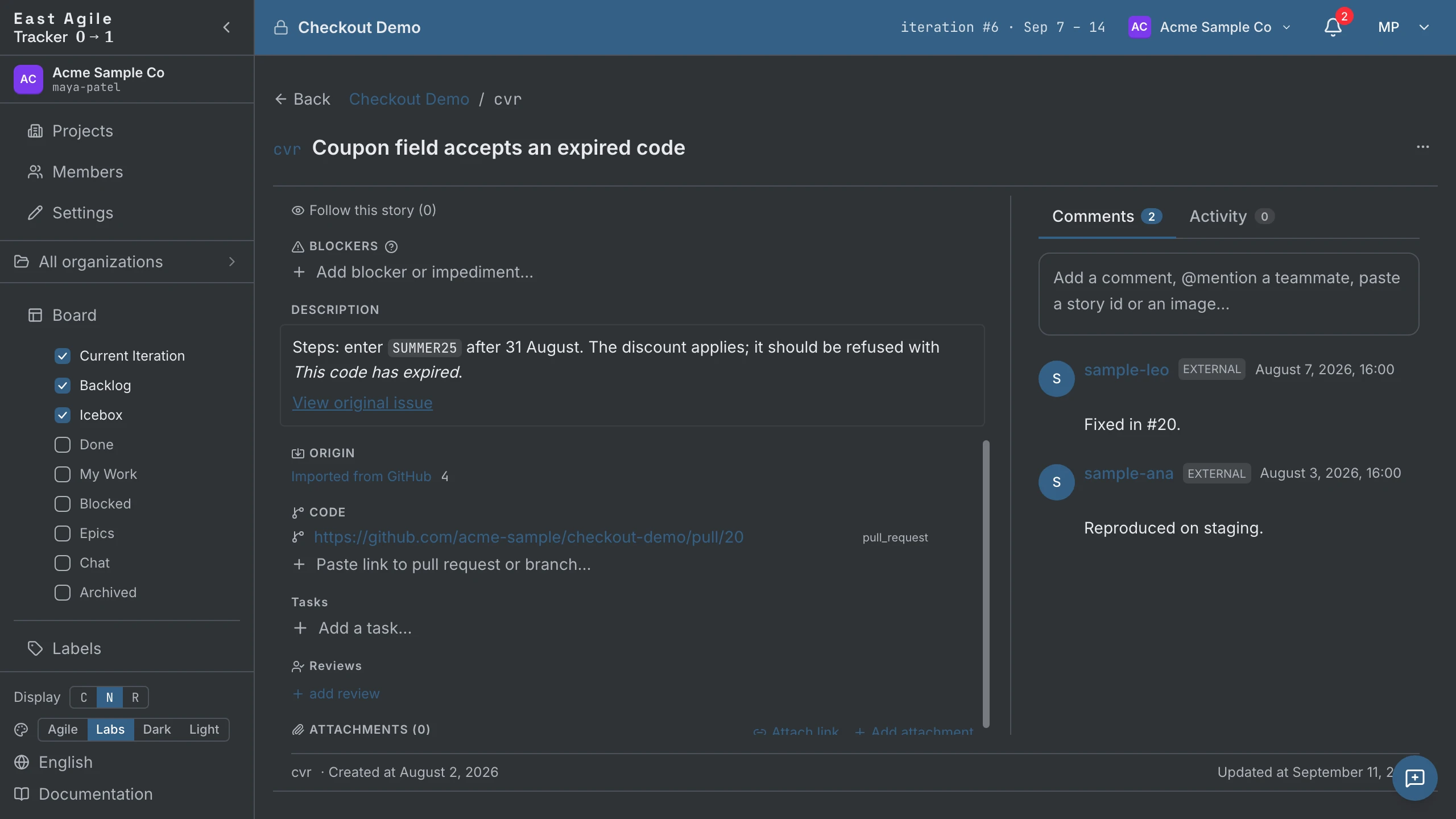
| Pull request | A story labelled pull-request. Open → started, merged → accepted, closed unmerged → rejected. | include_pull_requests |
| Milestone | An epic, titled after the milestone, deduped by title — two issues sharing a milestone land in one epic. With the flag off it rides along as a milestone:<title> label instead. | include_milestones |
| Release | A release story. Published → accepted, draft → unstarted. | include_releases |
| Issue dependency | A blocker on the story. Issues only, never pull requests. | include_dependencies |
Story type is inferred when the issue does not say. A label containing bug, fix, or defect — or a title starting with fix or bug — makes it a bug; chore, maintenance, devops, or infra makes it a chore; anything else is a feature. That is worth knowing before you import, because in East Agile Tracker only features carry points and only features feed velocity. See Introduction → Stories.
7. The agent works a story
Section titled “7. The agent works a story”Now the board has history on it, and the agent has a key. The loop from here is four calls.
Find a story, or write one. Filter the board for something to pick up:
curl "https://api.eastagiletracker.com/api/v1/projects/$PROJECT_ID/stories?state=unstarted" \ -H "X-TrackerToken: $TRACKER_TOKEN"import_source=github narrows it to what the import brought in. If the agent has found work the repo never captured, it creates the story instead — see API Guide → Create a story.
Claim it. An agent adds itself as owner by posting an empty body:
curl -X POST https://api.eastagiletracker.com/api/v1/projects/$PROJECT_ID/stories/$STORY_ID/owners \ -H "X-TrackerToken: $TRACKER_TOKEN" \ -H "Content-Type: application/json" \ -d '{}'An empty body means the caller, so the agent does not need to know its own id. The board now shows the agent as the owner, which is how a human watching knows the work is taken.
Start it.
curl -X POST https://api.eastagiletracker.com/api/v1/projects/$PROJECT_ID/stories/$STORY_ID/transitions \ -H "X-TrackerToken: $TRACKER_TOKEN" \ -H "Content-Type: application/json" \ -d '{"to": "started"}'Then the agent goes and does the work — reads the repo, writes the code, opens the pull request. That part happens in your coding tool, not here.
Attach the pull request.
curl -X POST https://api.eastagiletracker.com/api/v1/projects/$PROJECT_ID/stories/$STORY_ID/links \ -H "X-TrackerToken: $TRACKER_TOKEN" \ -H "Content-Type: application/json" \ -d '{"url": "https://github.com/octocat/hello-world/pull/42"}'A GitHub pull-request URL is recognised as one — you do not have to say so. The story and the code that closes it are now one click apart in both directions.
Finish it. Transition to finished and stop there. A feature still has delivered and accepted ahead of it, and those are the review gates: someone other than the agent decides the work is right. A chore has no such gate — started → accepted is its whole remaining path.
Tokens and rate limits
Section titled “Tokens and rate limits”Every import authenticates. The issue, comment and pull-request fetch runs on GitHub’s GraphQL API, and GraphQL rejects a request that carries no token — there is no anonymous tier, on a public repository or a private one. The question is never whether a token goes to GitHub, only whose.
Your own token
Section titled “Your own token”Pass token on the import call, or --token to GitHub-to-EAT. A fine-grained personal access token with read access to the repository’s issues is enough. It drives the upstream GitHub calls and nothing else: it is never logged, never audit-logged, never stored, and never echoed back in a response or an error.
Bring your own for anything past a demo. You then spend a budget nobody else touches, and no preflight can refuse you for someone else’s import.
--engine direct leaves you no choice. That engine reads GitHub from your machine rather than through the Tracker, so the server’s token is out of reach; a token-less run exits 2 with a usage error before it fetches or writes anything. GITHUB_TOKEN in your environment or your .env counts, the same as --token.
What forces the token is the issue walk, not the whole engine. direct reads issues, comments and pull requests over GraphQL, which has no anonymous mode; it touches REST only for the releases listing and the free /rate_limit probe. The tool still ships an older anonymous REST fetcher that ran a public-repo import inside the 60-per-hour budget, but no CLI path reaches it any more and it is due to be deleted, so treat --token as required for direct.
The deployment’s shared token
Section titled “The deployment’s shared token”Send no token and the server substitutes the platform token its operator configured (GITHUB_IMPORT_PAT). Three limits ride along:
- It is optional configuration. The hosted eastagiletracker.com provisions one, so a token-less public-repo import works there. A self-hosted install — the downloaded binary — has none until its operator sets
GITHUB_IMPORT_PATin the environment, and until then it refuses every token-less import with400import_github_no_token. - It reads public repositories only. The hosted service mints it read-only over public repos, so a private repository always needs your own token.
- Every caller on the deployment shares one budget. Before a token-less import runs, the server reads the shared token’s remaining GraphQL points and refuses with
400import_github_shared_quota_lowbelow 500. A budget that runs out mid-import fails the job withimport_github_rate_limited_platform. Both messages name the same fix: supply your own token.
What the token buys
Section titled “What the token buys”GitHub meters its two APIs separately, and the unauthenticated ceiling is two orders of magnitude lower.
| GitHub API | Used for | With a token | Without one |
|---|---|---|---|
| GraphQL | Issues, comments, pull requests, sub-issues, dependencies, releases | 5 000 points per hour, scored on the nodes a query returns | Refused — GraphQL has no unauthenticated tier |
| REST | The /rate_limit preflight only | 5 000 requests per hour | 60 requests per hour, counted per IP address and shared with everyone behind it |
An import never falls through to that 60-per-hour tier: with no token to send, the request is refused up front rather than retried anonymously. The number matters for what you do around the import — a script that reads GitHub directly, or a shell in the same network as other clients, exhausts 60 requests in seconds.
Read your own remaining budget any time; GET /rate_limit is exempt from both limits, so the check costs nothing:
curl -H "Authorization: Bearer $GITHUB_TOKEN" https://api.github.com/rate_limitGraphQL points are not requests. GitHub scores a query on the nodes it returns, so one page of 100 issues with their comments and assignees costs many points, and a large repository spends the hourly budget in far fewer calls than the REST-era numbers suggest. --dry-run (step 3) and dry_run (step 4) each cost the same points as the real fetch — that is what makes their counts trustworthy — so budget for two passes when you preflight a big import.
Where to go next
Section titled “Where to go next”- API Guide — search grammar, the event stream, bulk transitions, idempotent writes, and the rest of the surface.
- Operating Instructions — the same operations from the UI, and the other ten importers.
- Introduction — why the state machine and the four story types are shaped this way.
- GitHub-to-EAT — the importer’s own repository: every flag, both engines, and how to contribute to it.