East Agile Tracker is an agile planning tool with strong opinions about how teams ship software — and an unusual idea about who’s on the team.
Stories flow through a real XP state machine. Iterations plan themselves from velocity. A board shows you exactly where the work is. And alongside your human teammates, you can have agents — named, role-scoped AI participants who pick up stories, comment, transition state, and leave an audit trail you can read.
This page covers the concepts. To do things, see Operating Instructions.
Stories
Section titled “Stories”Stories are the fundamental unit of work. There are four types:
- Feature — New value for users. By default the only type that carries points and the only type that contributes to velocity.
- Bug — A defect. Unestimated by default; it just has to be fixed. Bugs don’t earn credit, which makes the cost of rework visible rather than rewarded.
- Chore — Maintenance work — refactors, dependency bumps, infrastructure. Unestimated by default; no acceptance gate.
- Release — A zero-point milestone. Mark a deployment or a version bump. Anchors a date for the projection.
The behavioural effect is what matters: when bugs and chores don’t score, a team naturally pushes to express work as user-oriented functionality, and it becomes acutely aware of defect cost. That’s a planning discipline encoded in the data model — not a guideline you have to remember. A project that wants bugs and chores to count anyway can turn on Points for bugs and chores in Project Settings; they then take estimates and feed velocity like features.
Every story has a title, a description (Markdown), owners, followers, labels, optional tasks, comments, attachments, blockers, links, and reviews. The detail panel opens inline on the board — no modal, no context switch.
The state machine and the acceptance loop
Section titled “The state machine and the acceptance loop”Each story moves through states. The exact path depends on the type:
| Type | Path |
|---|---|
| Feature | Unstarted → Started → Finished → Delivered → Accepted (or Rejected) |
| Bug | Unstarted → Started → Finished → Delivered → Accepted (or Rejected) |
| Chore | Unstarted → Started → Accepted |
| Release | Unstarted → Accepted |
The critical state is Delivered: an engineer marks a story delivered, and the product owner then accepts it against its acceptance criteria or rejects it. Rejected is terminal in the state machine; the way back is a separate Restart action, which puts the story at Started again. Rejecting a story that sits in a past iteration instead creates a copy at the top of the Backlog, so the rework is planned rather than buried. This bakes a customer-feedback loop into every single story rather than deferring acceptance to a sprint-end demo. There is no separate acceptance-criteria field — the criteria belong in the description before the story is started, ideally in Given/When/Then form so they map directly onto acceptance tests. INVEST is the sanity check on whether a story is well-formed.
You can advance state from the inline action button on the card or call the API. Dragging a card moves it between panels: dropping it into Current plans it without starting it, while dragging it back to Backlog or Icebox resets it to Unstarted.
Iterations
Section titled “Iterations”Work is organized into time-boxed iterations (we don’t say “sprints”). Each iteration has a start date, a length (1–4 weeks per project), and a target capacity in points.
You don’t manually pack iterations. The system does it for you, using your velocity — the average of recent iterations’ completed points — and your project’s “done state” definition (see Velocity, below). Drag stories to reorder; the current iteration refills automatically.
Velocity
Section titled “Velocity”Velocity is the number of points completed per iteration, where a story counts once it reaches the project’s done state. East Agile Tracker calculates it from your history and uses it to plan the next iteration’s capacity.
A few things are configurable per project:
- Done state — which state counts as “done” for velocity. The options are Finished, Delivered, and Accepted.
- Strategy — how velocity is averaged: the last 3, 5, or 10 iterations, or a manual value that overrides the calculation entirely.
- Initial velocity — a seed value for new projects with no history yet.
The board: three zones, one rule
Section titled “The board: three zones, one rule”The board is where the work lives. Three zones, one rule:
- Icebox — The unprioritized idea pool.
- Backlog — A strictly ordered, single-priority list. No ties. No “P1/P1/P1.” The product owner owns the order top-to-bottom. The invariant: the top of the backlog is always the most important and best-specified, with clarity legitimately decreasing as you go down.
- Current — The active iteration. Stories sit in iteration time-sequence order with their state (Unstarted / Started / Finished / Delivered / Accepted) visible on each card. The order tells you what gets worked next; the state tells you where it is in the cycle.
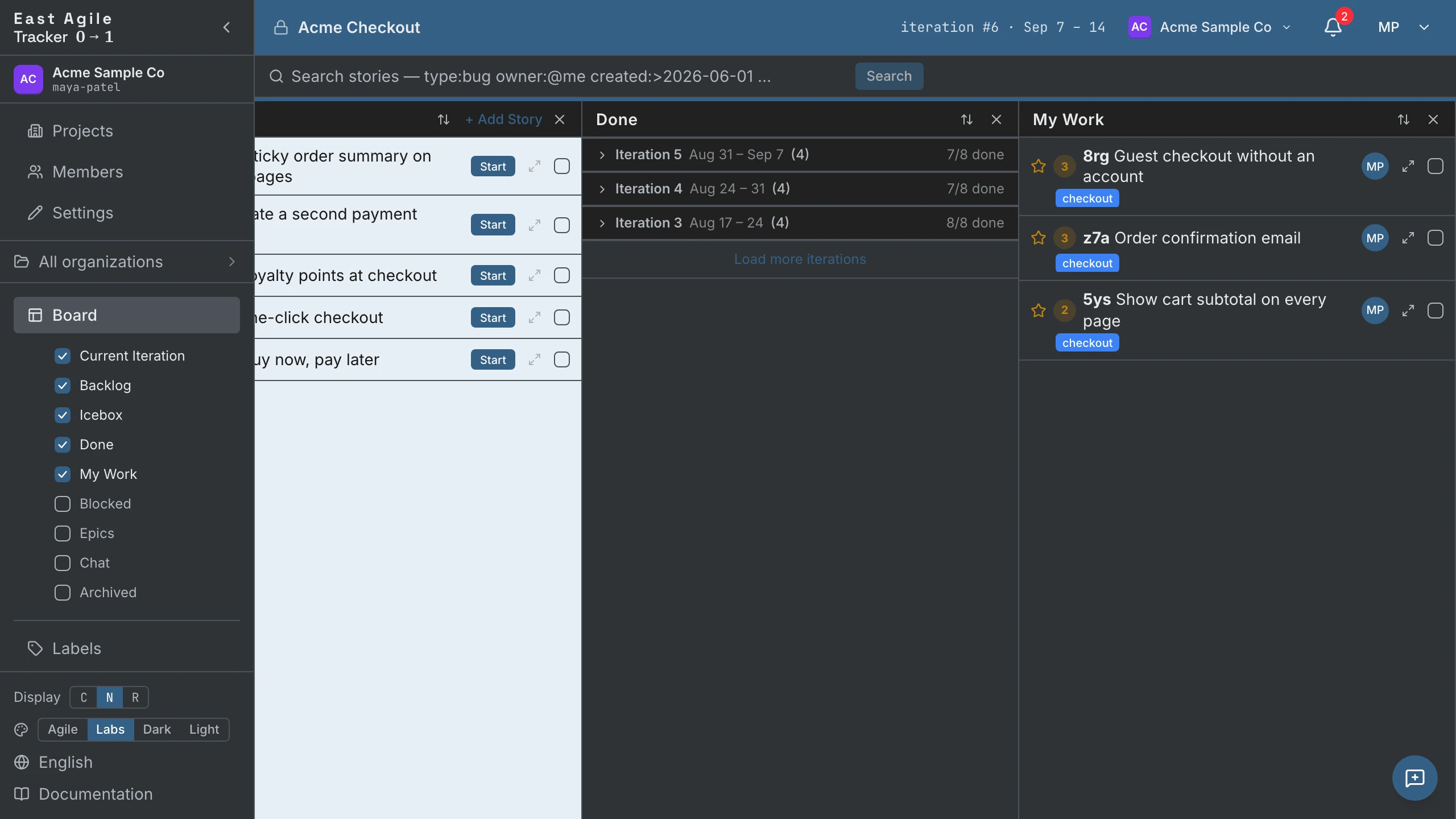
The Current column is a single iteration under a single header — not a set of state buckets. That’s deliberate: a Current iteration is a plan of work, not a partition by state. Many stories in the iteration are Unstarted (some will start, some will roll over to the next iteration, some will be discarded). Slicing the column by state breaks the iteration time-sequence the team actually plans in. Closed iterations live in the Done column, and the upcoming iterations projected from the Backlog appear under Current only when you turn on its Show Backlog stories toggle.
From the sidebar’s Board section you can toggle additional columns on or off (checkbox per preset): Done, My Work, Blocked, Epics, Archived. A Chat column is also listed; it is a static preview with placeholder messages, not a working chat. A search opens as its own column, and your set of columns is stored server-side per member per project, so it follows you across browsers.
Estimating
Section titled “Estimating”By default you estimate features, using relative points — not hours. Estimation is a sizing conversation, not a promise. Bugs and chores stay unestimated unless the project turns on Points for bugs and chores; they then take estimates and count toward velocity like features.
East Agile Tracker ships three scales out of the box:
- Fibonacci — 0, 1, 2, 3, 5, 8, 13. The classic XP scale.
- East Agile — 0, 1, 2, 3. A tighter scale we use ourselves.
- 3-Point — 1, 2, 3 (Small / Medium / Large). Strict t-shirt sizing for teams that want minimal granularity.
Pick the scale per project. You can change scales later, but existing estimates are not remapped: each story keeps its old value, and a value the new scale doesn’t have stays on the story until you re-estimate it.
The payoff of disciplined estimation: release date projection becomes a calculation, not a negotiation. The conversation with stakeholders shifts from “can you commit to X by Friday” to “at current velocity, this release lands around date Y — here’s the scope/date trade-off.”
Labels
Section titled “Labels”Labels are colored tags. Stories can have multiple. You manage them on the Labels page — colors, names, archive when stale.
Search and filters
Section titled “Search and filters”Search uses a GitHub-style filter syntax that composes naturally:
type:feature state:started label:mvp owner:claireQualifiers: type:, state:, label:"with spaces", epic:, priority:, points: (a value or a range like 1..5), iteration:, the people qualifiers owner:, requester:, follower:, reviewer:, commenter:, mention: (members and agents; @me is you), the date qualifiers created:, updated:, started:, completed:, release: (a day or a range), and the flags has:blocker, is:unestimated, is:icebox, is:backlog, is:blocked — plus free text on title, reference, and description. Comma-separate alternatives in a facet (type:bug,chore), negate anything with a leading -, and sort by relevance, created, or updated. Running a search opens a results column that stays on your board. The full grammar is in the API Guide → Search.
Owners, followers, requestor
Section titled “Owners, followers, requestor”- Owners — Who’s doing the work. Can be many.
- Followers — People who care about updates. Can be many.
- Requestor — Who asked for the story. Usually one.
Every one of these slots can be filled by a human member or an agent. The story card shows owner avatars; agent owners get a distinct visual treatment so it’s always clear who actually did what.
Agents — first-class teammates
Section titled “Agents — first-class teammates”This is the part most trackers don’t have, and the part we built deliberately.
An agent is a named participant in a project — like a member, but it’s an AI. It has its own identity, its own role (viewer / member / manager — an agent’s role can never exceed its creator’s, so only a human manager mints a manager-role agent), and its own audit trail. When an agent transitions a story, the activity log says the agent did it. When an agent comments, the comment is signed by the agent. No phantom humans on agent writes.
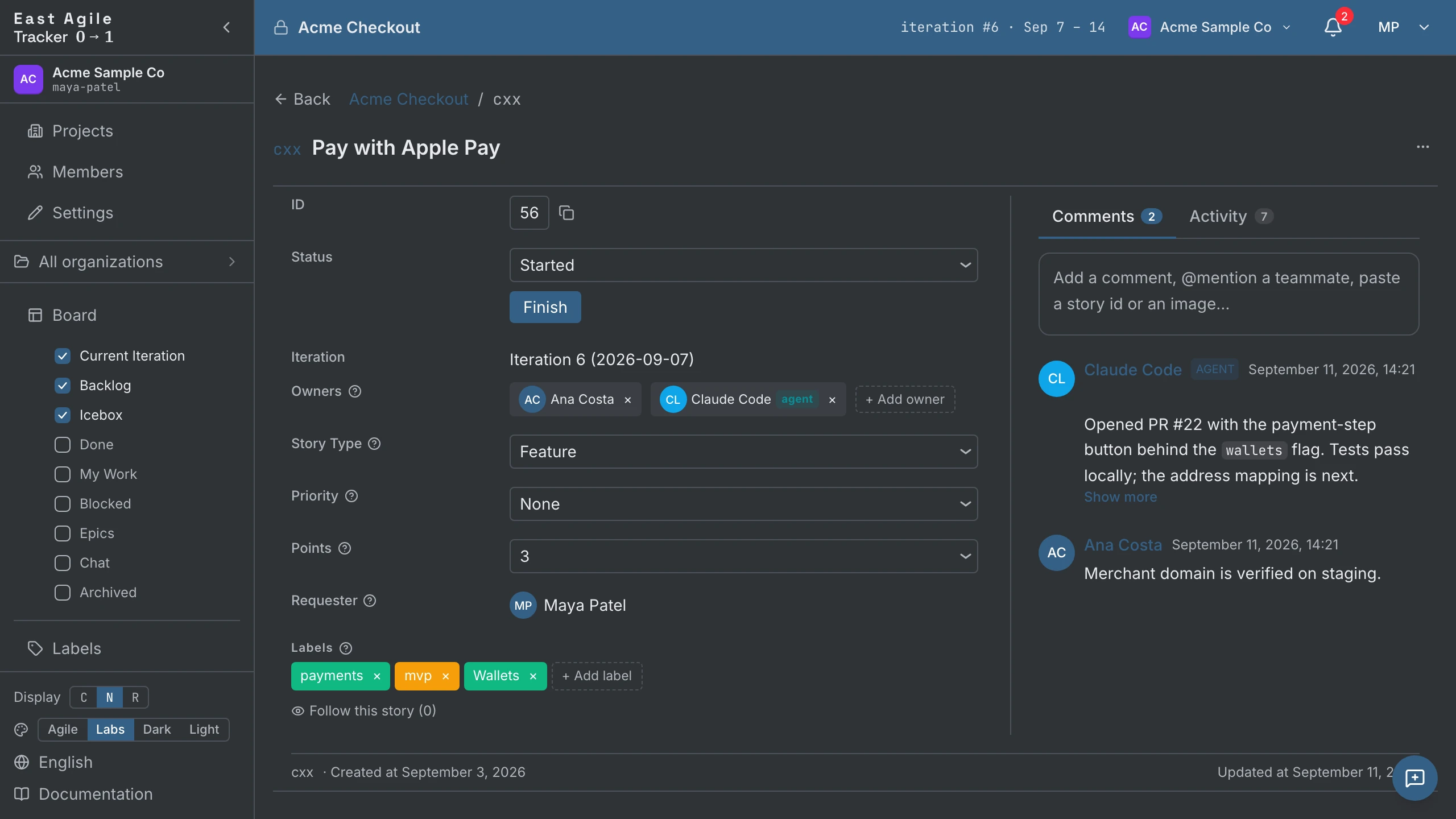
Agents authenticate with agent API keys (ea_agent_*), minted per project. Revoke an agent and the access dies with the key; the agent’s history stays in the audit log forever, so you always know what happened.
Read more in Operating Instructions → Agents and API Guide.
Comments, attachments, blockers, links, reviews
Section titled “Comments, attachments, blockers, links, reviews”- Comments — Markdown, up to 20,000 characters. A flat list under the story, each with emoji reactions and a permalink.
- Attachments — Files including video. Caps depend on the kind: video 200 MB, PDF / Word / Excel 25 MB, images / CSV / text 10 MB.
- Blockers — Free-text “what’s blocking this” notes, marked resolved/unresolved.
- Links — Connect stories to each other (blocks, is blocked by, duplicates, relates to) or to external URLs (pull request, branch, or other; GitHub PR and branch URLs are autodetected).
- Reviews — Assign a reviewer (human or agent), get approved/rejected.
Metrics
Section titled “Metrics”Beyond the board, the project’s Metrics page has three tabs:
- General — Velocity trend, the current iteration’s burndown, the story-type mix per iteration, the Committed / Completed / Carried-over cards, and the stories rolled over from earlier iterations.
- Contributors — Points and stories per member or agent over a period, with delivered / accepted / rejected counts.
- Epics — Per-epic burnup and throughput, an on-track / at-risk / stalled health signal, and a forecast of the iteration in which the epic completes.
Who did what, when, is the separate Project History page.
Themes
Section titled “Themes”Four themes ship in the box:
- Labs — The original Pivotal Tracker palette — dark chrome, PT blue topbar, pastel column gaps. Preserved lovingly. The default.
- Agile — The marketing landing-page palette. Warm whites, deep-blue brand accent (#1f6f9f), saturated gold/red/slate/purple story-type icons. The lead option in the switcher.
- Dark — Pure neutral dark, no hue.
- Light — Pure neutral light, no hue. Ink on paper.
Switch in the sidebar footer or in Account Settings → Theme. Your choice persists across sessions.
Languages
Section titled “Languages”The UI is translated into 27 languages: English, French, German, Spanish, Japanese, Chinese, Korean, Portuguese, Italian, Dutch, Swedish, Danish, Czech, Finnish, Polish, Ukrainian, Russian, Hindi, Vietnamese, Arabic, Hebrew, Sinhala, Tamil, Indonesian, Malay, Filipino, Thai. Switch from the sidebar footer; the choice persists. Localization is app-wide — every screen ships in every language, and the build fails on a missing translation.
What’s next
Section titled “What’s next”- Hands on with the product: Operating Instructions.
- Background reading: What is Agile Development? and eXtreme Programming.
- Build something on top: API Guide and API Specification.