The East Agile Tracker API is designed for agents as much as for humans. Everything you can do in the UI, you can do over the API — and a few things the UI doesn’t expose are there too.
This guide gets you from zero to “scripting your backlog” in under ten minutes. For the full endpoint reference, see API Specification.
Three kinds of credentials
Section titled “Three kinds of credentials”You authenticate with a key in the X-TrackerToken header. There are two kinds of key you mint yourself, and a third that an MCP client obtains for you:
- User keys (
ea_user_…) — Act as you. Create them in Account Settings → API Keys. Use these for personal scripts, CLI tools, integrations. - Agent keys (
ea_agent_…) — Act as a named agent in one project. Create them in Project Settings → Agents. Use these for AI agents — Claude Code, Codex, your own — that should participate in the project as named teammates. - MCP tokens (
ea_mcp_…) — OAuth 2.1 access tokens issued to an MCP client (Claude, an IDE) after you approve it on the consent page. They act as you, and you can revoke them under Account Settings → Connected apps.
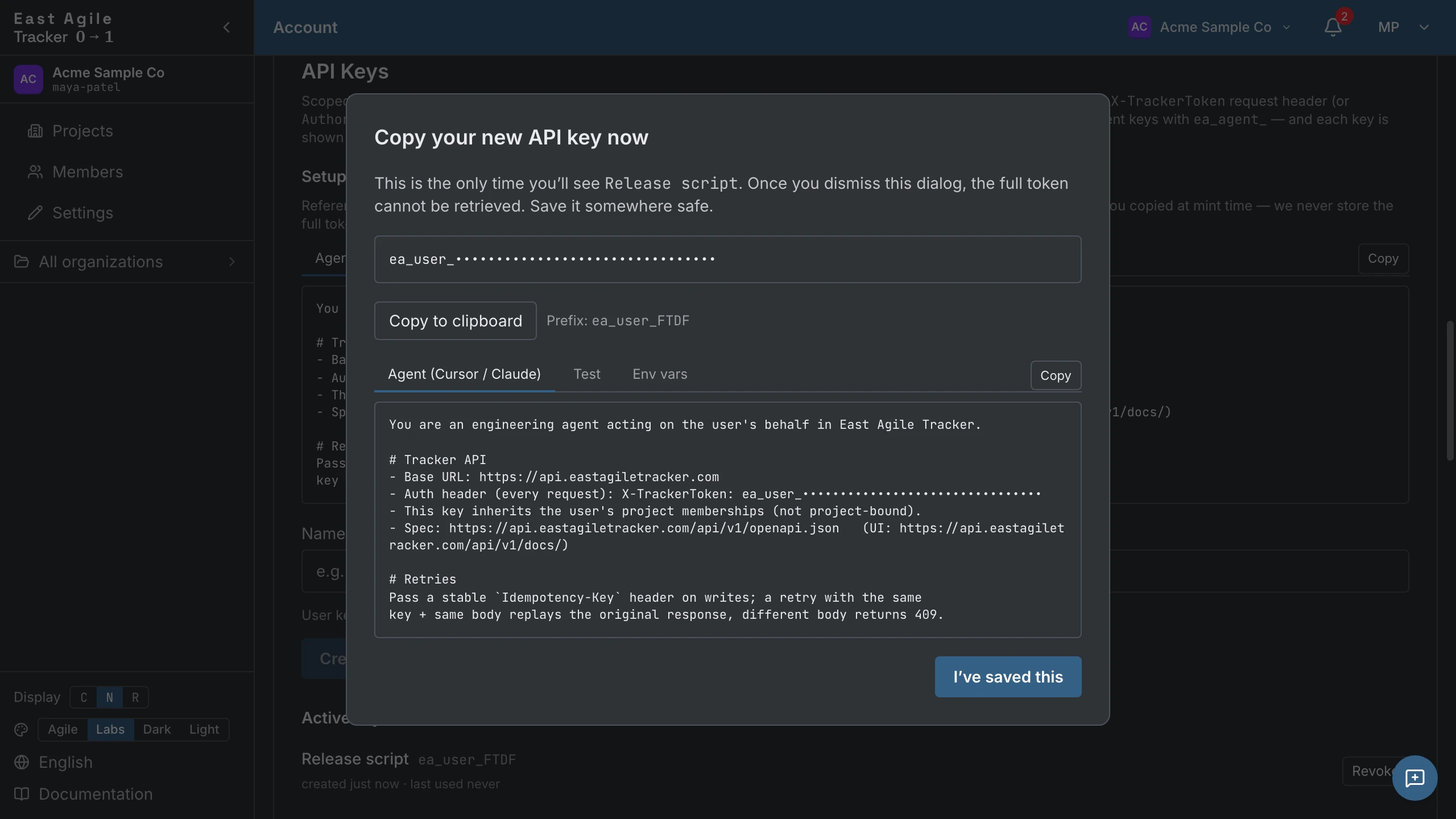
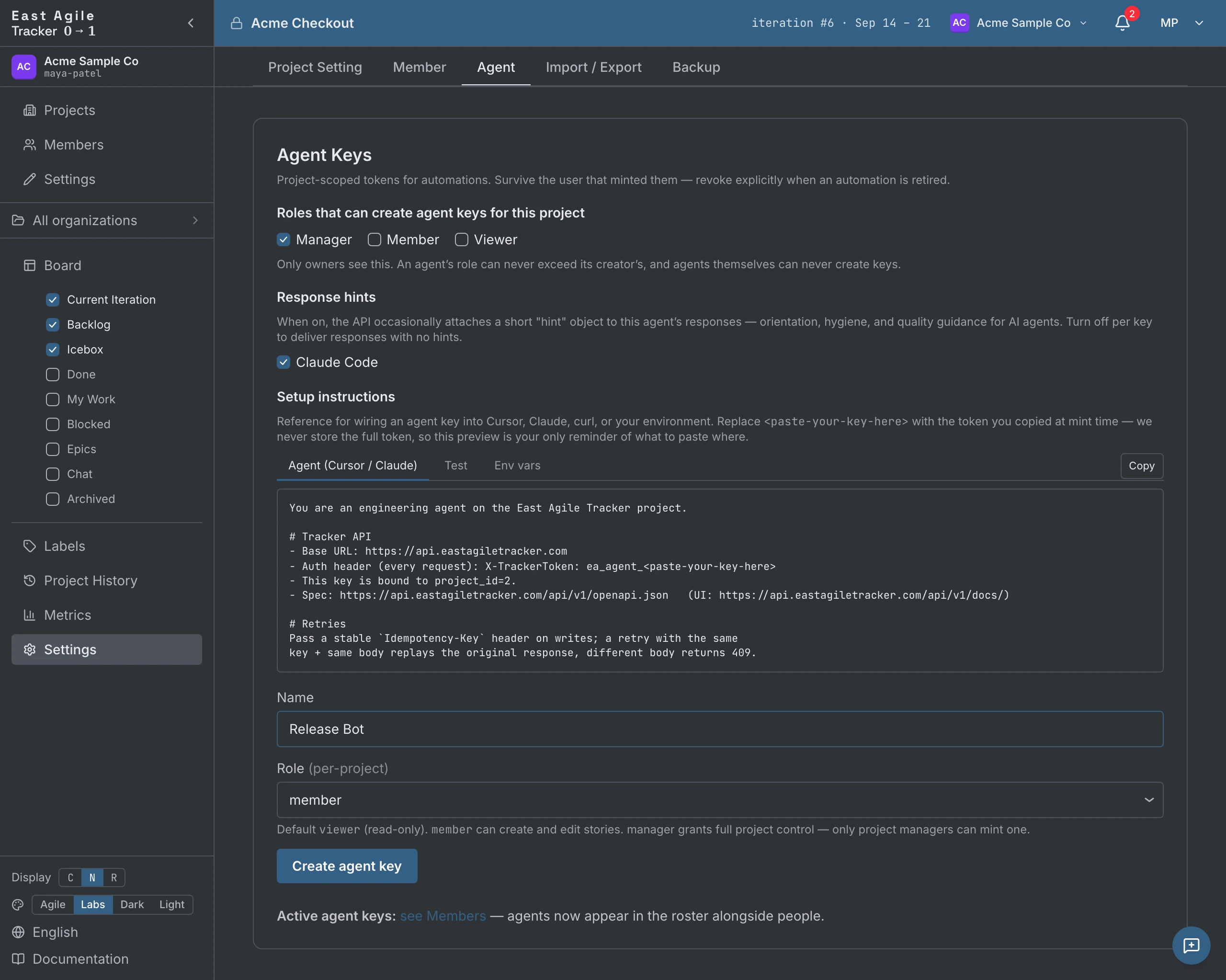
The differences between the two you mint:
| User key | Agent key | |
|---|---|---|
| Scope | All your projects | One specific project |
| Identity in audit log | Your name | The agent’s name |
| Role | Your role in each project | Set at key creation (viewer, member, or manager — never above the minting member’s own role) |
| Revocation | Revoke a key; you keep access via other keys/sessions | Revoke or rotate a key; the agent loses access immediately |
| Best for | Personal automation, scripts | AI agents that should be distinguishable from you in the history |
Authorization: Bearer … also works if you prefer that header style.
Hello, API
Section titled “Hello, API”Get your projects:
curl https://eastagiletracker.com/api/v1/projects \ -H "X-TrackerToken: $TRACKER_TOKEN"Or for an agent key, list the project it’s scoped to:
curl https://eastagiletracker.com/api/v1/projects \ -H "X-TrackerToken: ea_agent_xxxxx"The API is JSON, REST-ish, versioned at /api/v1/. Same shapes for humans and agents.
Create a project
Section titled “Create a project”curl -X POST https://eastagiletracker.com/api/v1/projects \ -H "X-TrackerToken: $TRACKER_TOKEN" \ -H "Content-Type: application/json" \ -d '{ "name": "Onboarding redesign", "description": "Q3 redesign of new-user onboarding", "iteration_length_weeks": 1 }'The response includes the project_id and any defaults the server applied (estimate scale, done state, etc.).
Create a story
Section titled “Create a story”curl -X POST https://eastagiletracker.com/api/v1/projects/$PROJECT_ID/stories \ -H "X-TrackerToken: $TRACKER_TOKEN" \ -H "Content-Type: application/json" \ -d '{ "name": "Add OAuth login for Google", "description": "## Acceptance\n- Google button on /login\n- Redirect back to original URL", "story_type": "feature", "estimate": "3", "labels": ["auth"] }'estimate is the scale value’s label as a string — "3", or "13" on the Fibonacci scale — because it has to match a point on the project’s scale. A JSON number is rejected.
Move a story through the lifecycle
Section titled “Move a story through the lifecycle”The transition endpoint validates the requested move and returns the allowed next states on error:
curl -X POST https://eastagiletracker.com/api/v1/projects/$PROJECT_ID/stories/$STORY_ID/transitions \ -H "X-TrackerToken: $TRACKER_TOKEN" \ -H "Content-Type: application/json" \ -d '{ "to": "started" }'The field is to (not to_state). If the move is illegal — say you tried to skip from unstarted straight to accepted — the response is 422 invalid_transition with structured error details:
{ "code": "invalid_transition", "error": "Cannot move story from `unstarted` to `accepted`", "details": { "from": "unstarted", "to": "accepted", "allowed": ["started"] }}This is one of the small things that makes the API agent-friendly: an agent can read details.allowed and choose the right next move without scraping prose.
rejected is terminal for the transition endpoint. To put a rejected story back to work, POST …/stories/{sid}/restart; POST …/stories/{sid}/reject is the verb form of rejecting a delivered one.
Comment on a story
Section titled “Comment on a story”curl -X POST https://eastagiletracker.com/api/v1/projects/$PROJECT_ID/stories/$STORY_ID/comments \ -H "X-TrackerToken: $TRACKER_TOKEN" \ -H "Content-Type: application/json" \ -d '{ "text": "Investigation done. Picking this up." }'The comment is attributed to whoever owns the API key — if it’s an agent key, the comment’s author is the agent.
Idempotent writes
Section titled “Idempotent writes”Every write endpoint accepts an Idempotency-Key header. Retry the same key with the same body, get the same response back. Retry the same key with a different body, get a 409 idempotency_conflict:
curl -X POST https://eastagiletracker.com/api/v1/projects/$PROJECT_ID/stories \ -H "X-TrackerToken: $TRACKER_TOKEN" \ -H "Idempotency-Key: $(uuidgen)" \ -H "Content-Type: application/json" \ -d '{ "name": "Refactor auth middleware", "story_type": "chore" }'This is critical for agents in retry loops — crash mid-write, retry with the same key, no duplicate stories.
Bulk transitions
Section titled “Bulk transitions”Move many stories at once. Each story is judged independently; one illegal move doesn’t fail the others.
curl -X POST https://eastagiletracker.com/api/v1/projects/$PROJECT_ID/stories/bulk_transition \ -H "X-TrackerToken: $TRACKER_TOKEN" \ -H "Content-Type: application/json" \ -d '{ "story_ids": [101, 102, 103], "to": "delivered" }'Follow the event stream
Section titled “Follow the event stream”For agents that want to react to what humans do, poll the events endpoint:
curl "https://eastagiletracker.com/api/v1/projects/$PROJECT_ID/events?since=$LAST_CURSOR&types=story.created,story.transitioned,comment.added" \ -H "X-TrackerToken: $TRACKER_TOKEN"Response is a cursor-paginated stream of events with the actor, the resource, and the change. Each event has an ID; pass the last ID you saw as since to resume where you left off. No webhooks, no scraping, no missed events. The stream needs the member role — a viewer gets 403.
Search
Section titled “Search”GET /projects/{id}/search?q=<query> runs a powerful full-text + structured
search over the project’s stories. The query language is modelled on GitHub’s
issue-search qualifiers — so syntax you (or an AI agent) already know from
GitHub mostly carries over.
curl -G "https://eastagiletracker.com/api/v1/projects/$PROJECT_ID/search" \ -H "X-TrackerToken: $TRACKER_TOKEN" \ --data-urlencode 'q=payment crash type:bug,chore owner:@me created:>2026-05-01'The response is a JSON envelope, stories ranked by relevance:
{ "results": [ /* canonical story objects */ ], "total": 42, "limit": 50, "offset": 0 }total is the full match count, not the page size. Page with limit (default
50, max 1000) and offset; order with sort=relevance (default), created,
created_asc, updated, or state.
Grammar
Section titled “Grammar”- Free text matches a story’s title, reference, and description (full-text,
stemmed and ranked). Wrap an exact phrase in
"quotes". - Qualifiers are
field:value. Comma-separate alternatives (OR within a field):type:bug,chore. Space-separate qualifiers (AND across them). - Negate any term or qualifier with a leading
-:-label:wontfix. - Ranges for dates and points: inclusive
a..b, or open-ended>x/<x.
Qualifiers
Section titled “Qualifiers”| Qualifier | Example | Matches |
|---|---|---|
type: | type:bug,chore | story type(s) |
state: | state:started,finished | workflow state(s) |
label: | label:"my label" | a label |
epic: | epic:"Checkout" | stories in an epic |
priority: | priority:p1 | priority |
points: | points:3 · points:1..5 · points:>3 | estimate value or range |
iteration: | iteration:42 | iteration id |
created: updated: started: completed: release: | created:2026-05-01..2026-06-01 · updated:>2026-06-01 | a date or range (day-granular); release: is the story’s release date |
owner: requester: follower: reviewer: commenter: mention: | owner:claire · owner:@me | a person by name or email — members and agents, mention: included; @me is you |
has:blocker | has:blocker | has an open blocker |
is: | is:unestimated · is:icebox · is:backlog · is:blocked | a flag |
mywork: is an alias for owner: — mywork:me is owner:@me. The older scheduled: qualifier is retired and silently ignored; use release:.
Comma-OR (type:bug,chore) applies to the facet qualifiers; the people qualifiers (owner: requester: follower: reviewer: commenter: mention:) take a single value.
Examples
Section titled “Examples”payment crash full text "payment" AND "crash""exact phrase" a phrasetype:bug,chore state:started bugs or chores that are startedowner:@me -label:wontfix mine, excluding the wontfix labelpoints:3..8 created:2026-05-01..2026-06-01 estimated 3-8, created in Mayfollower:tomas has:blocker tomas follows it and it's blockedis:backlog updated:>2026-06-01 backlog items touched since Jun 1The same query string drives the board’s search box (which opens a live results column) and this API — one grammar for humans and agents alike. Searching the content of comments, tasks, and blockers is on the roadmap; today free text covers the story’s own title, reference, and description.
Discover the API
Section titled “Discover the API”The live OpenAPI 3 spec is at:
https://api.eastagiletracker.com/api/v1/openapi.jsonSwagger UI is at:
https://api.eastagiletracker.com/api/v1/docs//openapi.json and /docs are unauthenticated — an agent can read the contract before it has a key. Once it holds a key, /api/v1/meta (which requires a valid key) returns its identity and the per-story-type transition graph; the reference-data lookups (/story_types, /story_states, /effort_scales, /priority_scales) are also unauthenticated. Together they let agents answer “what can I do here?” without trial-and-error 403s.
The served openapi.json carries request-body schemas for the write endpoints, including each field’s maxLength, so a client can validate before it sends. The Specification summarises the same shapes.
WebSocket control
Section titled “WebSocket control”For interactive automation — driving a logged-in browser session from a script, or remote-controlling the UI for tutorials — there’s a WebSocket channel:
const ws = new WebSocket('wss://eastagiletracker.com/ws/control?token=SESSION_JWT')ws.send(JSON.stringify({ action: 'get_state', id: 'req-1' }))The token is the browser session’s JWT, not an API key — an ea_user_* or ea_agent_* key is refused before the upgrade. Most users never need this; it’s there for the cases where REST isn’t enough.
Import from another tracker
Section titled “Import from another tracker”If you’re scripting a bulk migration:
curl -X POST https://eastagiletracker.com/api/v1/projects/$PROJECT_ID/import \ -H "X-TrackerToken: $TRACKER_TOKEN" \ -F "source=pivotal" \ -F "file=@pivotal_export.csv"Supported file sources: pivotal, jira, asana, gitlab, shortcut, trello, linear, plane, plane_json, eat (East Agile Tracker’s own export — the round-trip format). The multipart endpoint runs synchronously and answers with the result counts.
GitHub imports from the API instead of a file, via the JSON endpoint — no file, just the repository coordinates:
curl -X POST https://eastagiletracker.com/api/v1/projects/$PROJECT_ID/import/json \ -H "X-TrackerToken: $TRACKER_TOKEN" \ -H "Content-Type: application/json" \ -d '{ "source": "github", "owner": "octocat", "repo": "hello-world", "token": "ghp_…", "include_pull_requests": false, "include_milestones": false, "include_releases": false, "include_dependencies": false }'The JSON endpoint is asynchronous: it answers 202 with { "import_id", "status" } and you poll GET /projects/{id}/imports/{import_id} until the job reaches done or failed. Only one import runs per project at a time — a second call while one is in flight is 409 import_already_running. The whole loop, with the job’s progress fields, is in Populate a project from a GitHub repo.
The token is optional on the wire, but the fetch itself always authenticates — it runs on GitHub’s GraphQL API, which has no unauthenticated tier. Omit token and the server substitutes its platform token: public repositories only, shared by every caller, and refused with import_github_shared_quota_low when its GraphQL budget drops below 500 points. A private repository, or a deployment that configured no platform token (import_github_no_token), needs yours. Whichever token runs, it is used only for the upstream GitHub calls and is never stored or echoed back. Full detail, including GitHub’s 60-request unauthenticated REST ceiling, is in Populate a project from a GitHub repo.
Dry-run preview. Add "dry_run": true (JSON) or -F "dry_run=true" (multipart) to any source. The import parses, resolves, and de-duplicates exactly as a real run, produces the same result counts (imported, skipped, errors, unmatched), then rolls everything back — nothing is written. On the JSON endpoint the counts arrive on the polled job, dry run or not.
Limits. An upload body is capped at 10 MiB, and a single import at 5,000 stories; exceeding either is a 400 with nothing written. Re-importing a file is safe — rows already imported (matched by source id) are skipped, not duplicated.
Export a project
Section titled “Export a project”Any project role can list the formats; downloading one is owner-only:
# The registered export formats: { id, name, content_type, drops, includes_archived }curl https://eastagiletracker.com/api/v1/projects/$PROJECT_ID/export/formats \  -H "X-TrackerToken: $TRACKER_TOKEN"
# Download one format (eat is the full-fidelity round-trip CSV)curl https://eastagiletracker.com/api/v1/projects/$PROJECT_ID/export/eat \  -H "X-TrackerToken: $TRACKER_TOKEN" -o project-export.csv
Interchange format ids: eat, jira, pivotal, shortcut, trello, asana, gitlab, linear, plane, plane_json, plus the document formats pdf and docx. Every attachment is downloadable as one zip from GET /projects/{id}/export/attachments.
Error format
Section titled “Error format”All errors are JSON with at minimum:
{ "code": "invalid_transition", "error": "Cannot move story from `unstarted` to `accepted`"}Many error responses also include a details object — details.fields (an array of offending field names) on validation_failed, and details.allowed (alongside from/to) on 422 invalid_transition. Use them. A 429 rate_limited carries a Retry-After header in the same JSON envelope.
Pagination
Section titled “Pagination”List endpoints accept limit and cursor. Cursor is opaque; pass the next_cursor from the previous response. The limit cap is per endpoint — 200 on stories, comments, and projects, 500 on events, 1000 on search and the audit log. A plain (non-cursor) list that had to truncate its response says so in headers: X-Tracker-Pagination-Truncated, -Limit, -Offset, and -Next-Offset, which you pass back as offset= for the next page. There is no total-count header.
What’s next
Section titled “What’s next”- API Specification — Every endpoint, every verb, every shape.
- Operating Instructions → Agents — UI-side: minting agent keys, naming agents, revoking.
- Introduction — Concepts behind the API: stories, states, iterations, velocity, agents.